Yellowpay Partner API — Integration Guide
Sandbox endpoint:
https://staging-api.getyellowpay.com/partner/graphqlGraphiQL:
https://staging-api.getyellowpay.com/partner/graphiqlThis guide covers the integration flow and the meaning behind each operation. For the complete list of types, fields and arguments, use the Docs panel in GraphiQL — it is generated from the live schema and always current.
What the API does
Yellowpay lets a business that buys from you take net terms (30, 60, 90 days…): Yellowpay funds the invoice to you up front, invoices the buyer with the agreed terms, and collects the repayment. The Partner API lets you offer this inside your own ordering flow: your customer picks "net terms" at checkout, your platform creates the request with Yellowpay, the customer e-signs a purchase agreement through DocuSign, and Yellowpay funds it.
Terminology
Yellowpay's terms may differ from the ones your platform uses. In this guide and in the API:
| Term | Meaning |
|---|---|
| Customer | The business buying from you and repaying Yellowpay. If your platform calls these businesses something else — vendors, installers, dealers, accounts — this is them. |
| Vendor (or seller) | You, the Yellowpay partner. Where the API says "vendor" (for example VENDOR_DELINQUENCY), it means you. |
| Terms request | A request to finance a single invoice on net terms. One invoice, one terms request. |
| Net terms | The number of days the customer has to repay, e.g. 30, 60, 90. |
| Credit limit | The maximum a customer can have outstanding across all their terms requests with Yellowpay. |
| Invoice · funding · repayment | The three money movements, always named distinctly. You invoice the customer. Yellowpay funds the invoice — the payout to you. The customer makes the repayment to Yellowpay. The API never uses a bare "payment" for any of these. |
Environments
| Sandbox | Production | |
|---|---|---|
| GraphQL endpoint | https://staging-api.getyellowpay.com/partner/graphql |
Coming soon |
| GraphiQL | https://staging-api.getyellowpay.com/partner/graphiql |
Coming soon |
Production endpoints will be shared before your go-live; build and test against the sandbox for now.
The sandbox is fully separate from production: no real money moves and no real credit decisions are made. See Testing in the sandbox for what to expect from it.
Authentication
All requests must carry an API token issued by Yellowpay, sent as a bearer token in the Authorization header:
POST /partner/graphql HTTP/1.1
Host: staging-api.getyellowpay.com
Content-Type: application/json
Authorization: Bearer <your token>
Production tokens are created and managed by you in the Yellowpay app under Settings → API access (https://app.getyellowpay.com/settings/api-access). Sandbox tokens are issued by Yellowpay and sent to you by email — see Testing in the sandbox.
Each token has:
- Access levels —
READ,CREATE_CUSTOMER,CREATE_TERMS_REQUEST. A full checkout integration needs all three. In the app these appear as Read (READ), Register customer (CREATE_CUSTOMER) and Request Pay Later deal (CREATE_TERMS_REQUEST). - An optional IP allowlist. If your token has one, requests from other IPs are rejected.
- An expiry date.
A request without a valid token fails with the error code UNAUTHENTICATED (see Errors).
To use GraphiQL, add the token in the Headers tab at the bottom of the editor:
{ "Authorization": "Bearer <your token>" }Then verify your setup with tokenInfo — the simplest first call to make:
query TokenInfo {
  tokenInfo {
    name
    accessLevels
    expires
    ipAllowlist
  }
}
Conventions
- Protocol — standard GraphQL over HTTP
POSTwith a JSON body{ "query": "...", "variables": { ... } }.GETis not supported. - Money — all amounts are USD
Floatwith two decimal places: invoices, fees, repayments and credit limits alike. - Dates —
LocalDateisYYYY-MM-DD.UTCDateTimeis ISO 8601 with aZsuffix, e.g.2026-08-26T12:00:00Z. - Strings — trimmed on input and must be non-empty.
Emailvalues are lowercased and trimmed. - IDs —
Customer.idandTermsRequest.idare integers. Treat them as opaque identifiers. - Lists —
customersandtermsRequestsare Relay-style paginated connections: passfirst(page size) andafter(cursor), readedges[].nodeandpageInfo. See Change polling. - Errors — standard GraphQL
errorsarray with a machine-readableextensions.code. Some errors return usable data alongside the error. See Errors — including a client configuration note you should not skip. - Examples — every example below uses variables. Do the same in your integration: it keeps the operation static and lets your GraphQL client validate and cache it.
Integration flow at a glance
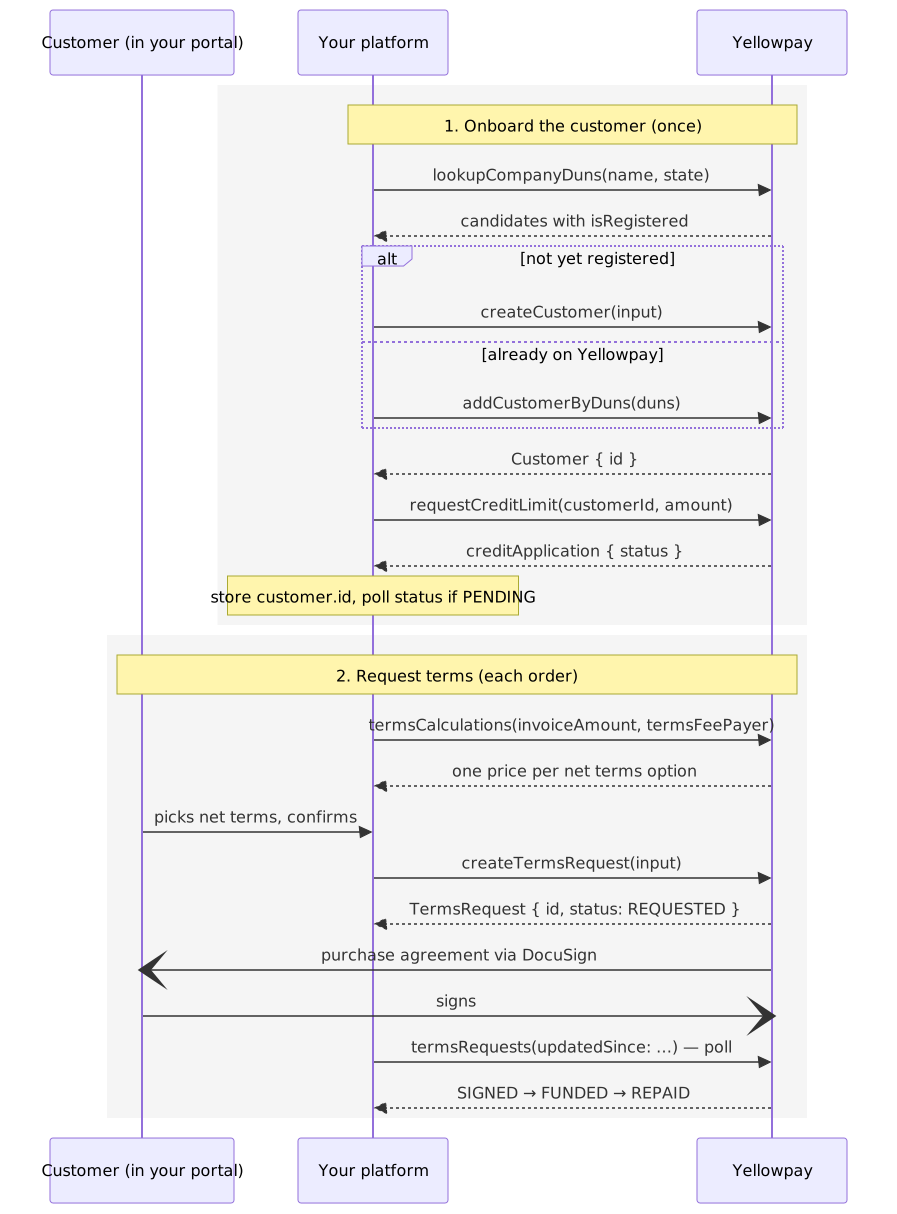
Two stages. The first happens once per customer, the second once per order.
1. Onboard a customer
Every read in the API is scoped to the customers linked to your account. A company enters your scope in exactly two ways: createCustomer (you register it with Yellowpay) or addCustomerByDuns (it's already registered — for example through another seller — and you link it). This section covers both.
1.1 Find the customer's DUNS
Onboarding keys on the DUNS number. If you don't have it, search by company name and (optionally) two-letter state code:
query LookupDuns($name: String!, $state: String) {
  lookupCompanyDuns(name: $name, state: $state) {
    duns
    name
    address
    isRegistered
  }
}
{ "name": "Sunrise Solar Installers", "state": "CA" }The query returns a list of candidate matches. Company names are rarely unique, so present the candidates (name and address) to the customer and let them pick the right one rather than taking the first result. Including state narrows the results considerably.
isRegistered tells you which door to use next: true → link the customer with addCustomerByDuns; false → register them with createCustomer. Both are in 1.2.
1.2 Register the customer — or link an existing one
Already registered with Yellowpay (isRegistered: true) — link the customer to your account:
mutation AddCustomerByDuns($duns: String!) {
  addCustomerByDuns(duns: $duns) {
    id
    businessName
    availableCredit
    creditApplication { status approvedLimit }
  }
}
It returns the full customer, credit standing included — if they already have an approved limit, you can skip straight to step 2. If no customer is registered with that DUNS, it fails with NOT_FOUND; register them instead. That fallback also makes a lookup-free shortcut possible when you already hold the DUNS: call addCustomerByDuns first, and on NOT_FOUND fall through to createCustomer.
Not yet registered (isRegistered: false) — register the customer:
mutation CreateCustomer($input: CustomerInput!) {
  createCustomer(input: $input) {
    id
    businessName
    duns
  }
}
{
"input": {
"businessName": "Sunrise Solar Installers LLC",
"duns": "123456789",
"address": {
"streetAddress": "2100 Geng Road",
"city": "Palo Alto",
"state": "CA",
"postalCode": "94304"
},
"primaryContact": {
"firstName": "Jane",
"lastName": "Doe",
"email": "jane@sunrisesolar.example",
"phone": "650-555-0142"
},
"accountsPayable": {
"name": "Bob Ledger",
"email": "ap@sunrisesolar.example",
"phone": "650-555-0143"
}
}
}Note what's not here: no credit amount. Registration alone grants no credit; requesting a limit is the separate next step.
Field notes:
primaryContact— the customer's main contact. This person signs purchase agreements unless you specify othersignerson a terms request.accountsPayable— the customer's accounts-payable contact. Yellowpay sends repayment notices here. All three fields are required.duns— from step 1.1/1.2, or your own records.
If a company with this DUNS is already registered, the mutation fails with DUPLICATE_DUNS and returns the existing customer in data — see Errors for how to make sure your client actually receives it. That customer isn't linked to your account yet: call addCustomerByDuns with the same DUNS, then continue with its id.
Store Customer.id. It is the customerId for every terms request this customer makes, and the argument to customer(id).
1.3 Request a credit limit
mutation RequestCreditLimit($customerId: Int!, $amount: Float!) {
  requestCreditLimit(customerId: $customerId, amount: $amount) {
    id
    availableCredit
    creditApplication {
      status
      requestedLimit
      approvedLimit
      created
    }
  }
}
{ "customerId": 4821, "amount": 50000.00 }amount must be at least the invoice you're about to finance, and it caps every future terms request for this customer — so request what you expect the customer to need over time, not just today's order.
Handling creditApplication.status:
| Status | Meaning | What to do |
|---|---|---|
APPROVED |
The limit is granted; approvedLimit and availableCredit reflect it. |
Continue to step 2. |
PENDING |
Yellowpay is underwriting the customer manually. Yellowpay contacts the customer directly, often asking for financials. | Poll customer(id).creditApplication.status. You can create terms requests meanwhile, but they are held for manual review until the limit is approved — usually better to wait. |
REJECTED |
Yellowpay declined to extend credit. | Offer the customer another payment method. |
requestCreditLimit is also how you request a higher limit for an already-approved customer. Calling it while an application is still PENDING fails with CREDIT_APPLICATION_PENDING and returns the customer (with the pending application) in data.
2. Request terms for an order
2.1 Price the options
One call prices every available net terms option, so you can render the whole selector — "Net 30 — $x · Net 60 — $y · Net 90 — $z" — from a single round trip:
query TermsCalculations($invoiceAmount: Float!, $termsFeePayer: TermsFeePayer) {
  termsCalculations(invoiceAmount: $invoiceAmount, termsFeePayer: $termsFeePayer) {
    netTerms
    invoiceAmount
    feesAmount
    totalAmount
  }
}
{ "invoiceAmount": 18750.00, "termsFeePayer": "CUSTOMER" }Illustrative response (fee rates on your account will differ):
{
  "data": {
    "termsCalculations": [
      { "netTerms": 30, "invoiceAmount": 18985.00, "feesAmount": 235.00,  "totalAmount": 18985.00 },
      { "netTerms": 60, "invoiceAmount": 19218.75, "feesAmount": 468.75,  "totalAmount": 19218.75 },
      { "netTerms": 90, "invoiceAmount": 19453.00, "feesAmount": 703.00,  "totalAmount": 19453.00 }
    ]
  }
}
termsFeePayer decides who bears the cost of the terms. It defaults to SELLER when omitted.
termsFeePayer |
Who bears the fee | invoiceAmount on the agreement |
totalAmount (customer repays) |
Your payout |
|---|---|---|---|---|
CUSTOMER |
The customer — the fee is added to the invoice | 19,218.75 (invoice + fee) | 19,218.75 | 18,750.00 |
SELLER (default) |
You — the fee is deducted from your payout | 18,750.00 | 18,750.00 | 18,281.25 |
Figures for the Net 60 row of the example. Re-run the query whenever the invoice amount or fee payer changes, and pass the same termsFeePayer to createTermsRequest, or the numbers the customer saw won't match the request.
2.2 Create the terms request
The invoice must exist before this call — Yellowpay finances a specific invoice, so issue it first and create the request against it.
Don't send this invoice to the customer yourself. Yellowpay invoices the customer directly, with the final amounts (including the fee when the customer bears it), the agreed terms, and the repayment details. Your invoice is the underlying document for the financing; if the customer received it too, they'd hold two invoices with different amounts and the wrong repayment instructions — and might repay you instead of Yellowpay.
mutation CreateTermsRequest($input: TermsRequestInput!) {
  createTermsRequest(input: $input) {
    id
    status
    amount
    netTerms
    termsFeePayer
    termsFeeAmount
    totalAmount
    purchaseDate
    dueDate
    reviewReasons
    signers {
      name
      email
      signing { status }
    }
  }
}
{
"input": {
"customerId": 4821,
"amount": 18750.00,
"netTerms": 60,
"termsFeePayer": "CUSTOMER",
"invoiceNumber": "INV-2026-00123",
"invoiceFile": {
"name": "INV-2026-00123.pdf",
"base64": "<base64-encoded file>"
},
"poNumber": "PO-88412",
"poFile": {
"name": "PO-88412.pdf",
"base64": "<base64-encoded file>"
},
"signers": [
{ "name": "Jane Doe", "email": "jane@sunrisesolar.example" }
],
"signedAgreementCC": ["orders@yourcompany.example"]
}
}Field notes:
customerId— theCustomer.idfrom step 1.amount— the invoice amount, excluding any Yellowpay fee. The same value you priced withtermsCalculations.netTerms— one of the values fromnetTermsOptions/ the calculations.invoiceFile— the invoice, base64-encoded; PDF or most common image formats.invoiceNumber— your invoice number, unique across your requests. A duplicate fails withDUPLICATE_INVOICE_NUMBERand returns the existing request indata— which also makes a blind retry after a timeout safe.signers— who signs the purchase agreement. Optional; defaults to the customer's primary contact.signedAgreementCC— optional. Addresses that receive a copy of the signed agreement, typically your own order desk.
File size — the request body is capped at 25 MB in total, shared by everything in it. Base64 encoding adds about a third, so budget roughly 18 MB of original files per request, split between invoiceFile and poFile. A typical invoice PDF is well under 1 MB; the ceiling only matters for large scans.
What happens next depends on the customer's credit:
- Approved limit covering the amount — Yellowpay emails the purchase agreement to the signers as a DocuSign envelope, and the request proceeds through the statuses below.
- Otherwise — the request is still created but held for Yellowpay's manual review.
reviewReasonsstates why (CREDIT_LIMIT,CUSTOMER_DELINQUENCY,VENDOR_DELINQUENCY), and the agreement is not sent while the review is open. Once Yellowpay clears the review it sends the agreement — no action is needed on your side.
If DocuSign itself fails, the mutation returns DOCUSIGN_ERROR but the request is created — don't create it again; contact Yellowpay and the agreement will be sent.
Store the returned id; the response also carries the committed economics (termsFeeAmount, totalAmount, dueDate = purchaseDate + netTerms days), so you can render a confirmation without recalculating.
2.3 Track the request
Yellowpay's side of the lifecycle is asynchronous — signing, review, funding, repayment. There are no webhooks yet, so poll. A signing round trip takes hours to days; polling on the order of minutes is plenty.
Change polling — one query for "what changed since my last poll", instead of polling every open request individually:
query Changes($updatedSince: UTCDateTime!, $after: Cursor) {
  termsRequests(first: 50, after: $after, filters: { updatedSince: $updatedSince }) {
    edges {
      node {
        id
        status
        statusUpdated
        reviewReasons
      }
    }
    pageInfo { hasNextPage endCursor }
  }
}
Pass the timestamp of your previous poll as updatedSince; page with after while hasNextPage is true. For one request in detail (per-signer progress, dates):
query TermsRequest($id: Int!) {
  termsRequest(id: $id) {
    id
    status
    reviewReasons
    dueDate
    signers {
      name
      email
      signing { status statusUpdated failureReason }
    }
  }
}| Status | Meaning | What to do |
|---|---|---|
REQUESTED |
Submitted. If reviewReasons is non-empty, the request is held for manual review; the agreement is sent automatically once the review clears. |
Wait. |
AGREEMENT_SENT |
The purchase agreement has been sent to the signers via DocuSign. | Tell the customer to look for the DocuSign email. signers[].signing.status shows per-signer progress. |
SIGNED |
All signers have signed. | Yellowpay proceeds to funding. |
FUNDED |
Yellowpay has funded the invoice — your payout has been made. | The customer now owes the repayment to Yellowpay, not you. |
REPAID |
The customer has repaid Yellowpay. | Nothing — the cycle is complete. |
REFUSED |
Yellowpay declined the request. | Offer another payment method. |
CANCELLED |
Cancelled — by the customer, or by you via cancelTermsRequest. |
Offer another payment method or close the order. |
REFUND_REQUESTED |
The customer has requested a refund; Yellowpay handles this manually. | No action for you. |
UNCOLLECTIBLE |
Yellowpay could not collect the repayment. | No action for you. |
Per-signer signing.status values: SENT, RECEIVED, OPENED, SIGNED, DECLINED, FAILED. FAILED means the DocuSign email couldn't be delivered — check failureReason and the signer's address, then fix it with resendAgreement. DECLINED means the signer refused to sign.
2.4 Fix problems: resend or cancel
Agreement bounced or wrong signer — resend, optionally with a corrected signer list (a supplied list replaces the current signers; omit it to resend to the current ones):
mutation ResendAgreement($id: Int!, $signers: [SignerInput!]) {
  resendAgreement(id: $id, signers: $signers) {
    id
    status
    signers { name email signing { status } }
  }
}
Allowed only while the status is AGREEMENT_SENT — after the agreement has gone out and before it's signed; otherwise it fails with REQUEST_STATUS_VIOLATION.
Order fell through — cancel:
mutation CancelTermsRequest($id: Int!) {
  cancelTermsRequest(id: $id) {
    id
    status
  }
}
Allowed while the status is REQUESTED, AGREEMENT_SENT or SIGNED — i.e. any time before funding. After FUNDED, contact Yellowpay instead.
3. Checking a customer's credit
Before offering net terms on an order, check whether the customer can take it:
query CustomerCredit($id: Int!) {
  customer(id: $id) {
    id
    businessName
    availableCredit
    creditApplication { status approvedLimit }
  }
}availableCredit— what the customer can request terms for right now. If it's lower than the order amount, the request isn't rejected outright — it goes into manual review withreviewReasons: [CREDIT_LIMIT].creditApplication— the latest application and its status; null if none has been made yet.- To raise a limit, call
requestCreditLimitwith the new amount.
customers(first: 20, filters: { query: "sunrise" }) lists your customers as a paginated connection, with free-text search.
Errors
Errors follow the GraphQL convention: errors[] carries the details, with a machine-readable extensions.code and an extensions.status mirroring the equivalent HTTP status.
{
  "data": { "customers": null },
  "errors": [
    {
      "message": "You need to log in to perform this action",
      "locations": [{ "line": 2, "column": 3 }],
      "path": ["customers"],
      "extensions": { "code": "UNAUTHENTICATED", "status": 401, "reason": null }
    }
  ]
}| Code | Returned by | Meaning and recovery |
|---|---|---|
UNAUTHENTICATED |
any operation | Token missing, invalid, expired, or the request came from outside the IP allowlist. |
DUPLICATE_DUNS |
createCustomer |
A customer with this DUNS already exists. The existing customer is returned in data — link it to your account with addCustomerByDuns, then continue with its id. |
NOT_FOUND |
addCustomerByDuns |
No customer is registered with this DUNS — register it with createCustomer instead. |
DUPLICATE_INVOICE_NUMBER |
createTermsRequest |
A request with this invoice number already exists. The existing request is returned in data — this makes retries after timeouts safe. |
CREDIT_APPLICATION_PENDING |
requestCreditLimit |
An application is already under review. The customer (with the pending application) is returned in data. |
REQUEST_STATUS_VIOLATION |
cancelTermsRequest, resendAgreement |
The request's status doesn't allow this operation — see the allowed statuses in section 2.4. |
DOCUSIGN_ERROR |
createTermsRequest, resendAgreement |
The DocuSign envelope could not be sent. The request still exists — on create, contact Yellowpay to get the agreement sent; on resend, try again. |
One failure bypasses this format entirely: a request body over 25 MB is rejected at the transport level with a plain HTTP 413 — no errors array, no extensions.code. If your client reports a parse failure or a bare 413 on createTermsRequest, check the size of the attached files first (see File size).
⚠ Configure your client for error-plus-data responses
The three DUPLICATE_* / *_PENDING errors return the existing object alongside the error — that's what makes them recoverable in one step. But many GraphQL clients discard data when errors is present. Apollo Client's default errorPolicy: 'none' does exactly this — with the default configuration, the customer or request Yellowpay hands back silently vanishes.
// Apollo Client — required for these mutations
const [createCustomer] = useMutation(CREATE_CUSTOMER, {
  errorPolicy: 'all', // keep data AND errors
});
Whatever your client, verify it surfaces both data and errors for these three mutations. Then branch on extensions.code, never on message text.
Operation reference
| Operation | Purpose | Access level |
|---|---|---|
tokenInfo |
Verify your token and its access levels | READ |
lookupCompanyDuns(name, state) |
Find a company's DUNS by name; flags already-registered companies | READ |
createCustomer(input) |
Register a customer (no credit yet) | CREATE_CUSTOMER |
addCustomerByDuns(duns) |
Link an already-registered customer to your account | CREATE_CUSTOMER |
requestCreditLimit(customerId, amount) |
Apply for (or raise) a customer's credit limit | CREATE_CUSTOMER |
customer(id) |
Fetch a customer, their available credit and credit application | READ |
customers(first, after, filters) |
List / search your customers (paginated) | READ |
netTermsOptions |
Available net terms, in days | READ |
termsCalculations(invoiceAmount, termsFeePayer) |
Price all net terms options in one call | READ |
createTermsRequest(input) |
Create a terms request for an invoice | CREATE_TERMS_REQUEST |
termsRequest(id) |
Fetch one terms request with signer detail | READ |
termsRequests(first, after, filters) |
List / filter your terms requests; updatedSince for change polling |
READ |
resendAgreement(id, signers) |
Resend the DocuSign agreement, optionally with new signers | CREATE_TERMS_REQUEST |
cancelTermsRequest(id) |
Cancel a request before funding | CREATE_TERMS_REQUEST |
Full field-level documentation for every type is in the Docs panel in GraphiQL.
Testing in the sandbox
The sandbox runs the same API against test data. Current behaviour:
- Token — there is no self-service token page for the sandbox yet. Request a sandbox token from your Yellowpay contact; it arrives by email.
lookupCompanyDuns— returns test data rather than querying Dun & Bradstreet. Live lookup in the sandbox is coming.- Credit — underwriting is mocked and approves instantly. To test the other outcomes, end the customer's business name with
[pending]or[rejected]when registering. - Agreements — DocuSign emails are delivered only to
test+addresses (e.g.test+jane@yourdomain.com); everything else is suppressed. Usetest+signer emails to run the signing flow end to end — the same rule applies tosignedAgreementCC. - Funding — to move a signed request to
FUNDEDand beyond, ask your Yellowpay contact.
Go-live checklist
- Production token created in the Yellowpay app (Settings → API access) with
READ,CREATE_CUSTOMERandCREATE_TERMS_REQUEST; IP allowlist configured if your egress IPs are static. - Your GraphQL client is configured to surface
dataalongsideerrors(Apollo:errorPolicy: 'all') forcreateCustomer,createTermsRequestandrequestCreditLimit. Customer.idis persisted against the customer on your side; both onboarding doors are wired —addCustomerByDunswhenisRegistered(or onDUPLICATE_DUNS),createCustomerotherwise.- Customers with a
PENDINGcredit application are not offered net terms until it'sAPPROVED. - The
termsFeePayerused intermsCalculationsis the same one sent increateTermsRequest. - Invoice numbers are unique; the
DUPLICATE_INVOICE_NUMBER+ existing-request response is handled as a success path for retries. - Your invoicing flow does not send the invoice to the customer for Yellowpay-funded orders — Yellowpay invoices the customer directly.
REFUSED,CANCELLEDand signerDECLINED/FAILEDare handled in your order flow;resendAgreementis wired up for bounced agreements.- Change polling with
updatedSinceis in place forSIGNEDandFUNDED.
Changelog
- 2026-09 — Production tokens are now self-service in the Yellowpay app.
- 2026-08 — Initial version.